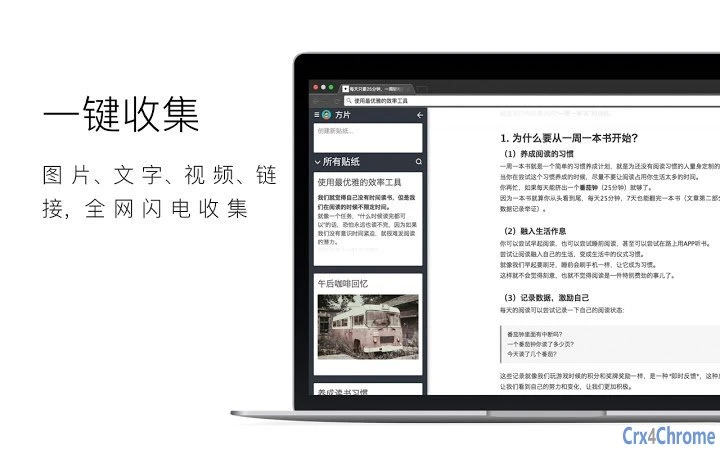

Беспрепятственная вырезка веб-контента для управления знаниями
Обзор
方片收集 is a desktop application designed to streamline the process of capturing and organizing fragmented digital content. It enables users to collect text, images, URLs, and videos directly from web pages with minimal effort. The tool is particularly useful for individuals who rely on gathering information from various online sources—such as researchers, students, content creators, and professionals managing knowledge repositories.
By allowing one-click or drag-based collection, it reduces the friction between inspiration and documentation. The software supports cross-device access through cloud synchronization, ensuring that collected materials remain accessible from both desktop and mobile devices. This feature is especially beneficial for users who switch between work environments or prefer to review content on the go.
While the developer did not provide additional details about their background, the application’s focus on intuitive content capture suggests a user-centered design philosophy. Real-world usage scenarios include compiling research materials, archiving reference images, saving video clips for later review, and sharing curated content with collaborators. The tool aims to transform scattered web snippets into a structured, searchable knowledge base.
Ключевые функции и возможности
- Сбор изображений с помощью перетаскивания: Users can collect images by dragging them to the left, with the option to download, share, or view the source URL.
- Вырезка текста и контента: Select any portion of web content and drag it leftward to save it directly into the application’s workspace.
- Захват видеоклипов: A dedicated “方片 icon” on video players allows users to collect video content with a single click or drag, ideal for saving highlights or key moments.
- Бесшовная синхронизация между устройствами: Collected data is stored in the cloud, enabling access from both desktop and mobile devices through a shared account.
- Передача через QR-код: Selected content can be converted into a QR code for instant transfer to a smartphone, facilitating quick on-the-go access.
- Совместный обмен: Users can share their collections with others, promoting knowledge exchange and teamwork.
These features are designed to enhance productivity by minimizing manual copy-paste workflows. For example, a student researching a topic can capture relevant paragraphs, images, and video excerpts in one session, then access them later on their phone during a commute. Similarly, a content creator can save visual references and video clips for future projects without losing track of sources.
The cloud-based architecture ensures that content remains available regardless of device changes or location shifts. While specific technical implementation details were not provided, the integration of drag-and-drop mechanics and QR-based transfer suggests a focus on simplicity and immediacy. The application’s ability to preserve context—such as original URLs and source metadata—adds value for users concerned with accuracy and traceability.
Пользовательский интерфейс, рабочий процесс и производительность
The user interface is structured around a clean, minimal layout focused on content capture and organization. Navigation is straightforward, with primary actions—such as collecting content and accessing saved items—placed within easy reach. The workflow is optimized for speed: selecting content and initiating a drag gesture triggers the capture process instantly.
This reduces cognitive load and supports rapid information ingestion. The application’s performance is expected to remain efficient given its lightweight footprint of 12.5 MB, though exact resource usage details were not specified. Stability during prolonged use was not documented, but the absence of reported issues in the release notes suggests a reliable baseline.
The developer did not provide performance benchmarks or CPU/RAM behavior metrics. Based on general software behavior patterns, the application likely operates smoothly on modern systems with standard web browsing activity. The integration with browser extensions may influence load times, but no performance degradation was noted.
Overall, the interface prioritizes usability, making it accessible even to users with limited technical experience.
Совместимость и системные требования
方片收集 is compatible with both Windows and Mac operating systems, supporting a broad range of desktop environments. The software has a release version of 1.0.0 and requires 12.5 MB of installation space. While the developer did not specify exact system requirements, such as minimum RAM or processor speed, the lightweight nature of the application suggests it can run on systems with modest hardware specifications.
Platform compatibility information is limited to the two major desktop operating systems, with no mention of Linux or other alternatives. The application likely relies on standard web rendering engines and cloud connectivity for core functionality. Users should ensure their devices have a stable internet connection to enable cloud synchronization and QR code transfer features.
The absence of detailed hardware requirements means that installation and operation may vary depending on individual system configurations. For users seeking precise compatibility details, the developer may provide updated documentation in future releases.
Плюсы и минусы
Плюсы
- Легковесный дизайн, всего 12,5 МБ
- Интуитивный интерфейс перетаскивания для быстрого захвата контента
- Синхронизация в облаке обеспечивает доступ с ПК и мобильных устройств
- Поддерживает несколько типов контента: текст, изображения, видео и URL-адреса
- Передача через QR-код упрощает обмен контентом между устройствами
- Бесплатно для скачивания и использования без ограничений лицензий
Минусы
- Точные системные требования не указаны
- Подробности о производительности при интенсивном использовании не предоставлены
- Информация о разработчике и компании ограничена
- О режиме офлайн для доступа к контенту не упомянуто
- Конкретные форматы файлов или варианты экспорта не указаны
Раздел часто задаваемых вопросов
Доступен ли 方片收集 для Windows и Mac?
Да, программное обеспечение совместимо с операционными системами Windows и Mac.
Могу ли я использовать 方片收集 без интернет-соединения?
Приложение требует активного интернет-соединения для синхронизации в облаке и передачи через QR-код. Возможности офлайн-доступа не указаны.
Программное обеспечение бесплатно для скачивания и использования?
Да, 方片收集 доступен бесплатно. Нет подписных сборов или скрытых платежей.
Как работает синхронизация в облаке?
Собранный контент хранится в облаке, позволяя доступ с настольных и мобильных устройств через общую учётную запись. Процесс синхронизации происходит автоматически при подключении.
Какие типы контента я могу собирать?
Вы можете собирать текст, изображения, URL-адреса и видеоклипы напрямую со страниц с помощью перетаскивания или специального «方片 icon» на видео.
Заключительные мысли + Призыв к действию
方片收集 выделяется как упрощённое решение для людей, желающих организовать цифровые знания с минимальными усилиями. Его основная сила заключается в беспрепятственном захвате разнообразного веб-контента — текста, изображений и видео — с помощью интуитивных жестов. Включение доступа с разных устройств через синхронизацию в облаке и передачу через QR-код добавляет значительную ценность для пользователей, работающих на нескольких платформах. Хотя конкретные технические детали, такие как системные требования и производительность под нагрузкой, недоступны, лёгкий размер приложения и ориентированный на пользователя дизайн предполагают широкую доступность. Он особенно подходит для студентов, исследователей и креативных профессионалов, регулярно собирающих информацию из онлайн-источников. Бесплатная модель ценообразования повышает его привлекательность, делая его доступным для широкой аудитории. Для тех, кто хочет создать более упорядоченное цифровое рабочее пространство без сложности, 方片收集 предлагает убедительное решение. Скачайте 方片收集 сейчас.







